The Journey from Code to Docs
By Chris Rickard · March 27th, 2026
✨ Summarize & explore this article with AI: ChatGPT
 Perplexity
 Gemini
 Claude
 Grok
Grok
The world runs on software, but most of that software is not new.
Almost every company now depends on software to run operations, serve customers, move money, make decisions, and create revenue. But behind the modern apps and new AI tools, a huge amount of business-critical software is old, deeply interconnected, poorly documented, and understood by fewer, and fewer people every year.
That has been a core area we have been tackling at Userdoc, trying to answer the question:
How can we understand what existing software really does, using the code as the source of truth, and turn that understanding into functional documentation humans can use?
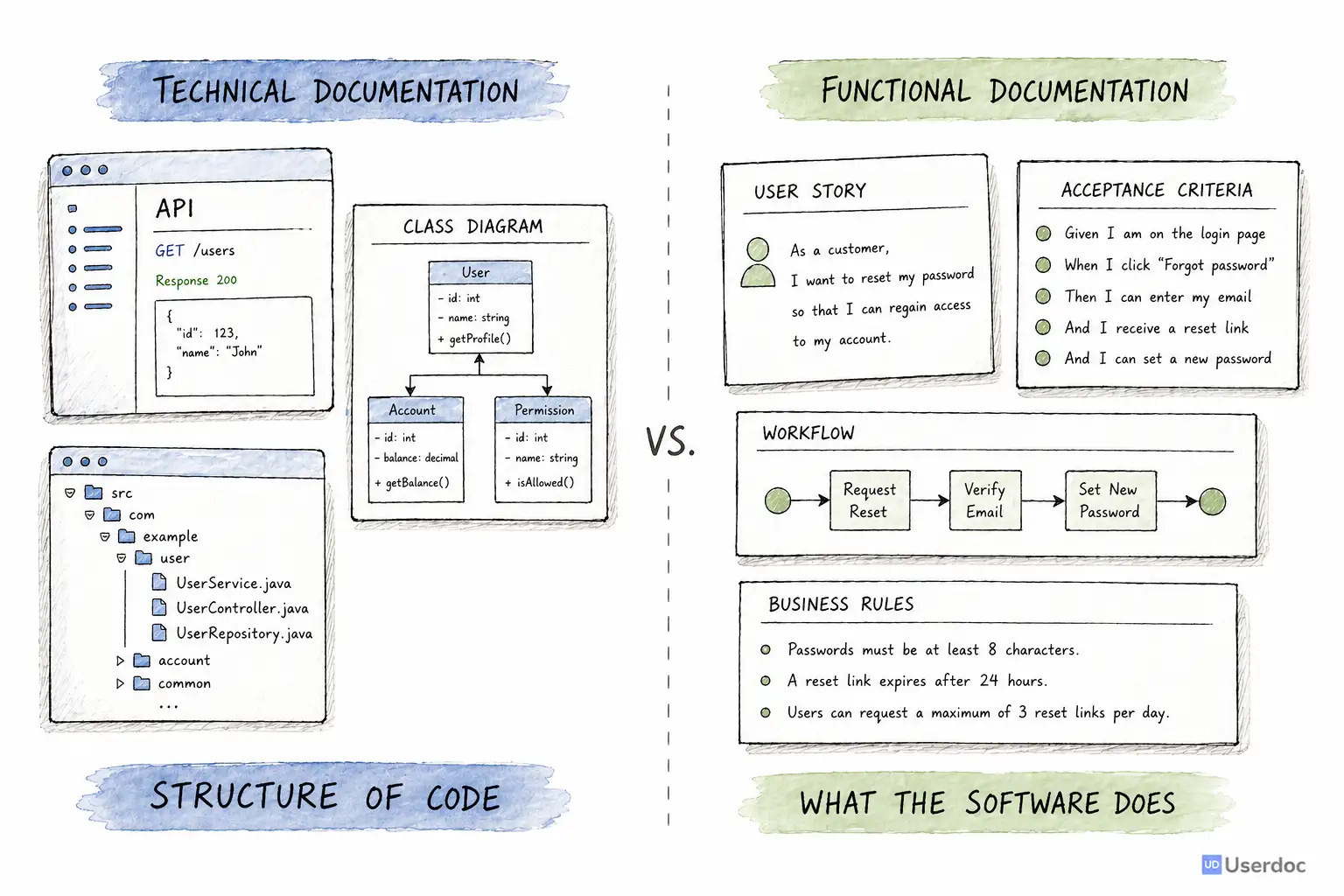
Not technical documentation but Functional documentation: user stories, acceptance criteria, workflows, business rules, edge cases, and the intent behind the system.
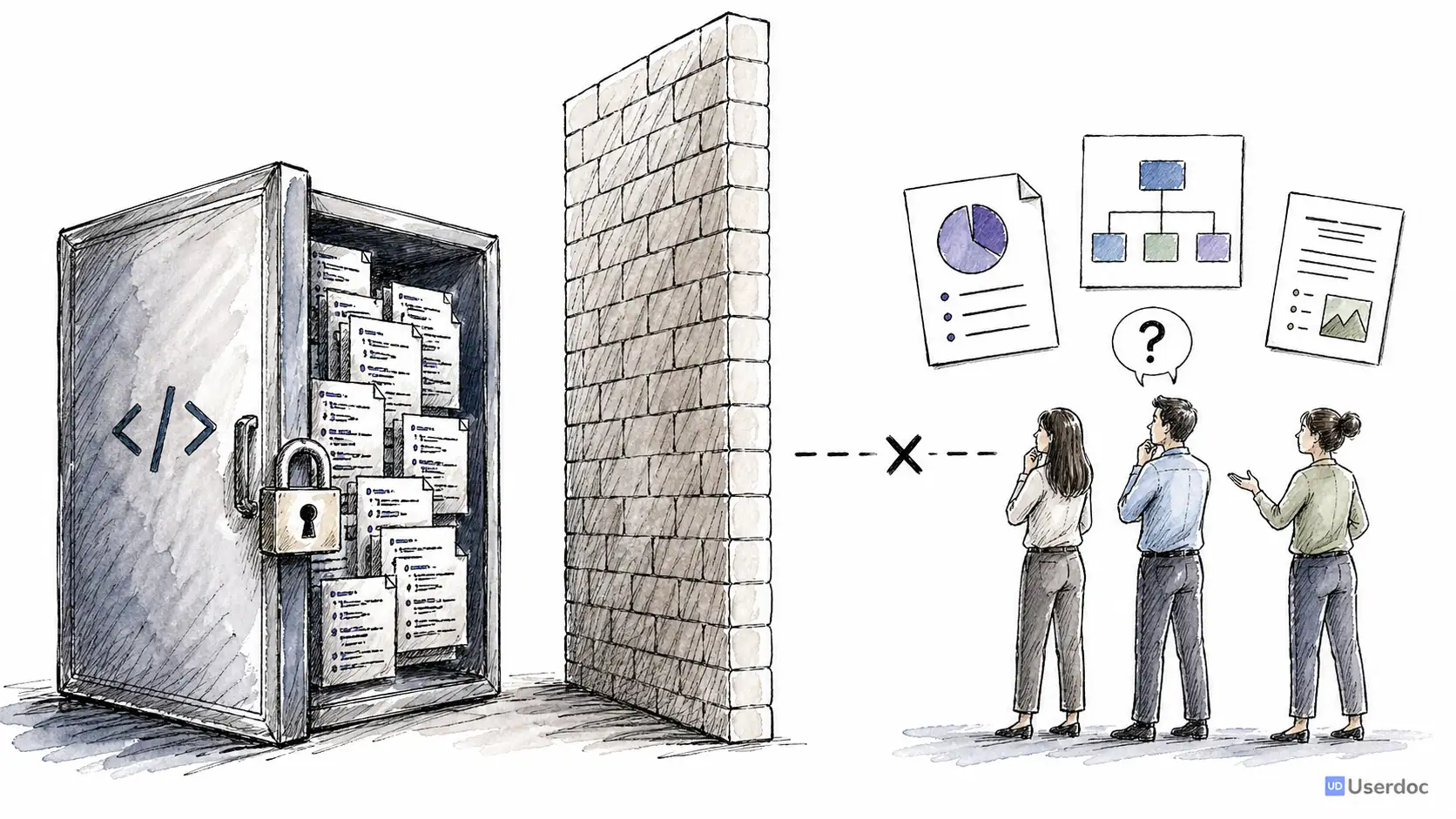
Software engineers can already read the code, but people in a business are not software engineers. They cannot read code, and any documentation they still have is usually out of date and useless.
We need to reverse engineering the code back into amazing, accurate, detailed current-state documentation
The Opportunity
Legacy software is not a niche problem. It is the majority of software.
Many organisations still rely on systems that are ten, twenty, or thirty years old. They might be written in Visual Basic, Delphi, COBOL, old Java, classic ASP, or a framework nobody has willingly touched since 2002 or beyond.
Those systems often contain the most important business logic in the company. Pricing rules. Compliance workflows. Customer onboarding. Risk checks. Operational exceptions. The weird edge case someone added after a production incident in 2014.
The hard part is not simply that the software is old. The hard part is the cost of understanding it.
When documentation is missing or outdated, every change begins with uncertainty:
- What does this system actually do?
- Which rules are still used?
- Which features are connected?
- What will break if we change this?
- Who still understands the original intent?
For years, the only honest answer was: give a team of engineers and analysts a few months, let them read the code, talk to stakeholders, compare notes, and gradually build a picture of the system.
I know this pain personally.
Before Userdoc, I spent nearly a decade running a software development agency. We worked on large legacy rebuilds where the first three to six months could disappear into understanding the existing system before anyone was confident enough to replace it.
There had to be a better way.
From New Software to Existing Software
Userdoc started as an AI-infused requirements management platform for new software.
The original problem was clear: teams struggle to describe what they want to build. Userdoc helped turn rough project ideas into structured requirements, user stories, acceptance criteria, personas, journeys, and project scope.
But the more we worked with customers, the more the same pattern appeared.
They did not always need help describing a brand new system. Sometimes they needed help understanding the old one.
They had a working application. They had source code. They had scattered tribal knowledge. But they did not have accurate functional documentation.
That led to the question I became obsessed with:
Could AI deeply understand how existing software works, using nothing but the code, and explain it in a way the whole organisation could use?
We had already written about the promise of AI-generated documentation for legacy software systems, but behind the scenes this has been a multi-year technical journey.
Technical Docs Are Easy. Functional Docs Are Hard.
There are already plenty of tools that can generate technical documentation from code.
They can create API references, dependency graphs, class diagrams, architecture diagrams, and method summaries. These are useful, especially for engineers.
But they usually answer technical questions:
- What classes exist?
- Which functions call each other?
- What endpoints are available?
- How is the code organised?
That is not the same as answering functional questions:
- What can a user actually do?
- What business rule is being enforced?
- What happens when this payment fails?
- Which workflow is this screen part of?
- What screen is shown when I click this button?
That distinction matters.
Code is written for computers and engineers. Requirements are written for teams.
If AI was going to make legacy systems understandable, it had to move beyond "this file contains a controller" and toward "this feature lets an administrator approve a refund when these conditions are met."
Gen 1: Proving AI Could Understand Code
The first generation of Code-to-docs started in 2023.
At the time, the best models were GPT-3.5 and GPT-4. Context windows were small, output limits were tight, and every serious experiment was expensive and slow.
But the first question was simple: is this even possible?
Could we feed code into an LLM and get back a useful explanation of the behaviour?
The answer was yes.
That was the first breakthrough. LLMs were surprisingly good at reading source code and explaining the intent behind it. They could identify workflows, infer business rules, and translate implementation details into plain English.
The problem was scale.
A real system is not one file. A feature might be spread across controllers, services, models, database queries, configuration, scheduled jobs, and shared utilities. A single file might exceed the model context window. A small change in one place might only make sense after following references across dozens of files.
So Gen 1 became a knowledge graph and summarisation problem.
We processed the codebase, identified relationships, summarised files, and then used those summaries to generate requirements-style documentation.
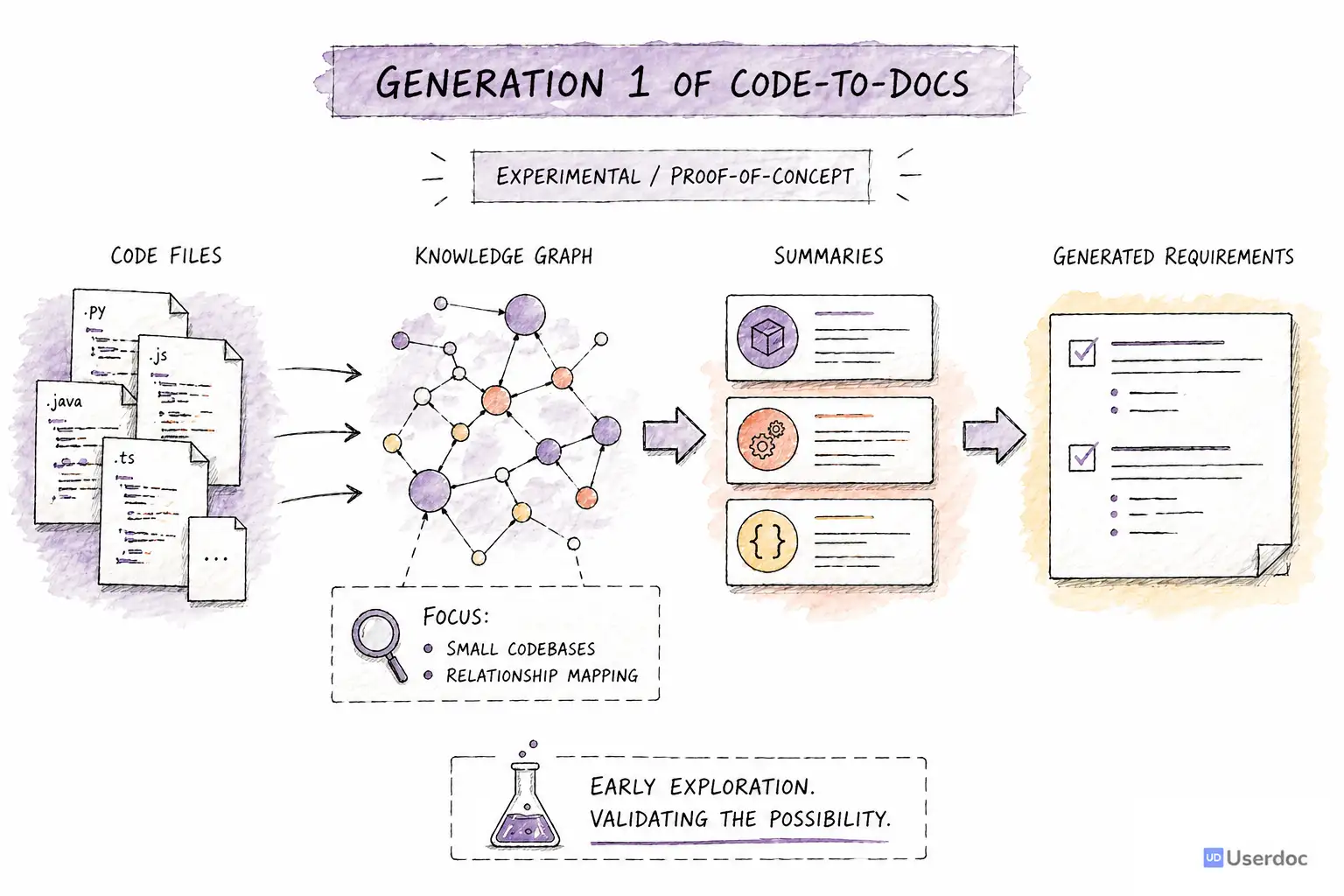
It worked well enough to prove the concept. We could generate meaningful functional documentation from code.
But it was not good enough yet.
Accuracy was roughly 70 percent. It handled small codebases, but struggled with larger systems, unusual frameworks, and deeply connected edge cases. It also lacked enough human review points. The AI could generate impressive output, but it could not reliably know when it had misunderstood something important.
The proof of concept was proven. The product was not.
Gen 2: Bigger Context Windows Changed the Game
In 2024, large context models changed what was possible.
Gemini 1.5 Pro introduced a one million token context window, and two of the biggest Gen 1 bottlenecks suddenly became solvable.
We rebuilt the system around a different idea: instead of trying to understand the whole codebase through tiny windows and many summaries, we could give the model far more of the system at once.
Gen 2 grouped codebases into high-level business domains we called themes. The AI would identify broad areas of functionality, then ask a human to confirm or adjust them.
From each theme, it would surface features. Again, a human could confirm, remove, rename, or reshape them before the system generated detailed requirements.
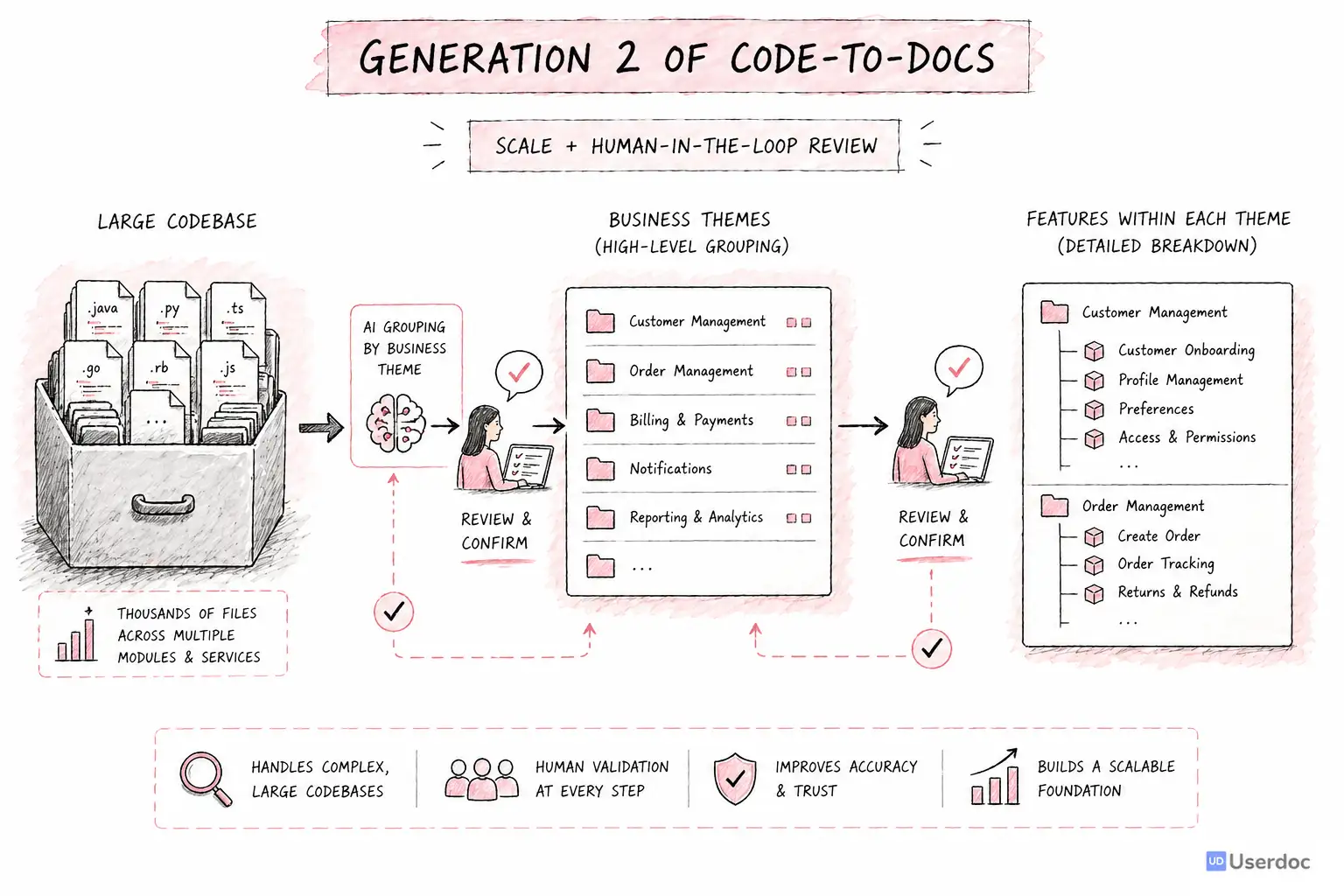
This was the first commercially viable version.
It could handle much larger systems. We benchmarked it across five codebases. Accuracy moved to roughly 85 percent. We made our first large Code-to-docs sale: a 1.5 million line Visual Basic system that needed to be understood before it could be modernised.
It was still expensive, but it worked.
More importantly, it taught us what mattered.
Human-in-the-loop was not a nice-to-have. It was central to the product. The best results came when AI did the heavy exploration and humans confirmed the structure at the right moments.
But Gen 2 also exposed a deeper limitation.
It was a sophisticated pipeline. Around thirty steps. Lots of processing. Lots of state. Lots of carefully designed prompts.
And pipelines treat every codebase as if it should follow the same path.
Legacy systems do not work like that.
The Skeletons in the Closet
Every legacy system has surprises.
Some critical business rules are not in the code at all. They live in lookup tables, stored procedures, old configuration files, database triggers, or data that only makes sense when you understand the organisation.
Some frameworks do a lot of magic. Routes are inferred. Views are generated. Behaviour appears through naming conventions rather than explicit references.
Some systems have dead code that looks important. Others have important code that looks dead. Some have duplicated workflows that only differ because one customer needed an exception fifteen years ago.
A fixed pipeline can process steps. It can be reliable, measurable, and repeatable.
But it is not naturally curious.
It does not stop and say, "This feature does not make sense yet, I need to inspect the database schema." It does not backtrack after discovering an assumption was wrong. It does not decide that one module needs deeper investigation while another can be safely summarised.
That became the next problem to solve.
Gen 3: The Agentic Era
By 2026, the constraint had shifted again.
Context windows were no longer the bottleneck. Models were smarter, faster, and much better at tool use. Multi-turn reasoning had become more reliable. Agents could read files, follow references, run deterministic tools, check assumptions, and change course.
The missing piece was not more tokens.
It was more autonomy.
That is where Gen 3 comes in.
Instead of forcing every codebase through a fixed pipeline, we are moving toward agents that can explore software more like an experienced engineer would.
An agent can inspect a file, follow a reference, notice an inconsistency, search for related behaviour, inspect configuration, and decide what to do next. It can use deterministic tools for structure and AI for judgment. It can ask for human review when the next decision needs domain knowledge.
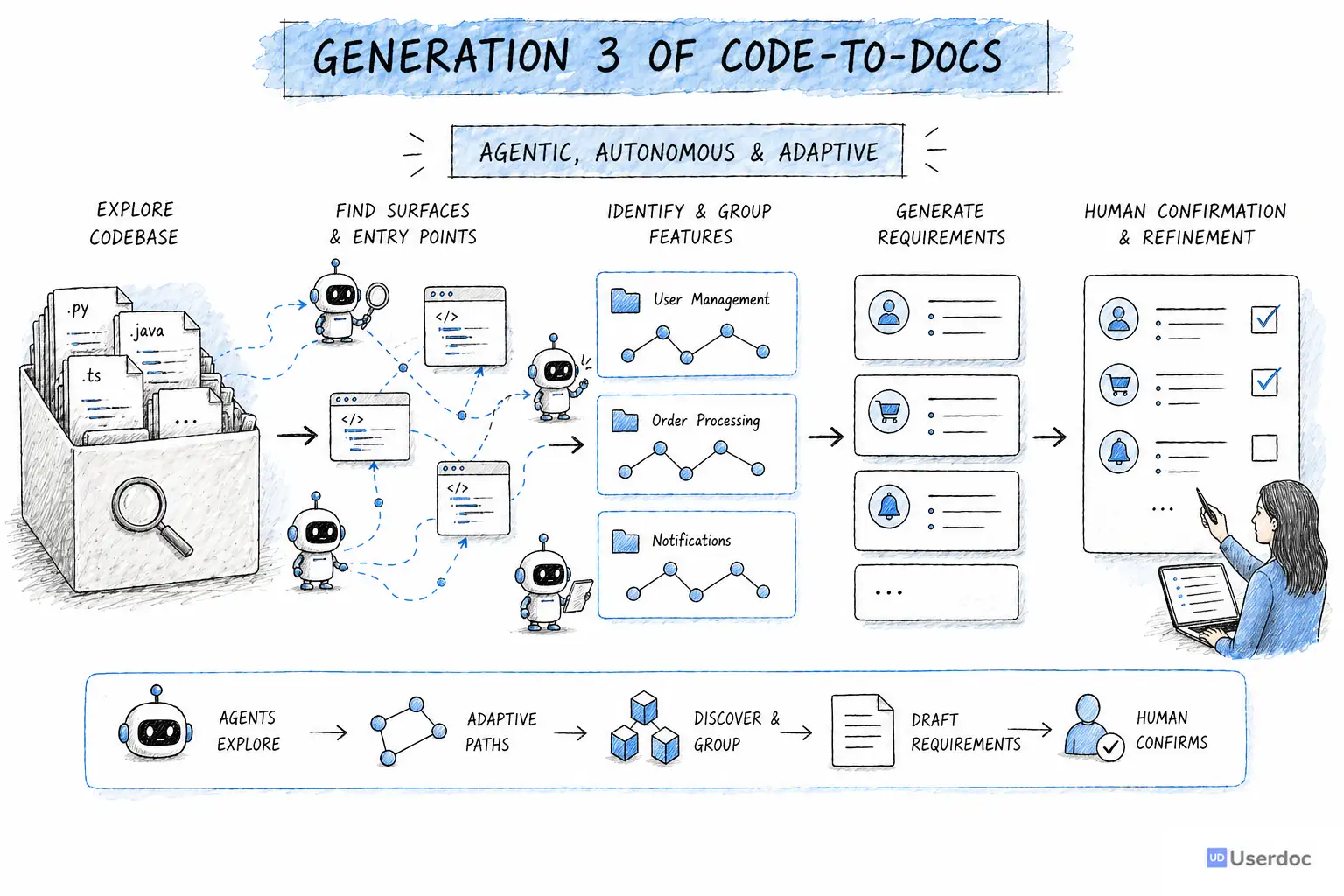
The model we are building around has three stages:
- Find surfaces. Agents look for the visible touchpoints in the system: screens, APIs, jobs, imports, exports, integrations, and other places where behaviour enters or leaves the software.
- Find features. Agents explore those surfaces and group them into meaningful functional features for human confirmation.
- Generate requirements. Agents dig deeper into each confirmed feature and produce detailed requirements, acceptance criteria, rules, and supporting context.
This is still grounded in the lesson from Gen 2: humans stay in the loop.
The difference is that the AI is no longer trapped inside a rigid path. It can roam. It can recover from mistakes. It can spend more effort where the codebase is strange and less effort where the structure is obvious.
Where We Are Today
Gen 3 is not a shipped product yet.
We are building it and using it on real customer projects right now. The early benchmarks are very promising, with accuracy above 90 percent in the areas we have tested so far.
More importantly, the depth is better.
The agentic approach is much stronger at handling legacy complexity because it can adapt to what it discovers. It can identify when important behaviour is hidden outside the obvious source files. It can follow clues. It can ask better questions.
There is still a long way to go.
Agents can be expensive. They can be unpredictable. They require careful constraints, strong tooling, and thoughtful human review points. The goal is not to let AI wander forever. The goal is to give it enough freedom to understand the system, while keeping the final documentation grounded in evidence.
That is the balance we are working on now.
What Three Years Has Taught Us
This journey has changed how I think about AI and software documentation.
The hard part is not generating text. AI can generate fluent text very easily.
The hard part is preserving truth.
If documentation is going to guide a rebuild, a migration, a compliance review, or a product decision, it cannot just sound right. It has to be connected back to the actual system.
The lessons so far are simple:
- Start with structure, not interpretation. Before generating requirements, understand the surfaces, domains, relationships, and boundaries of the system.
- Use AI where judgment is needed. Deterministic tools are better for parsing, indexing, counting, and tracing. AI is better for interpreting intent.
- Keep humans in the loop. The right human confirmation at the right moment improves quality dramatically.
- Let the approach match the codebase. A simple app should not need the same path as a 4 million line legacy system.
- Preserve evidence. Functional documentation is only useful if teams can trust where it came from.
Where We Are Going
Legacy software is not going away.
But the people who understand it are retiring, moving teams, or carrying too much knowledge in their heads. At the same time, businesses need to modernise faster. They need to migrate old systems, integrate AI, replace brittle workflows, and reduce operational risk.
We used to accept that understanding a large system took months.
I do not think that has to be true anymore.
AI will not replace the humans who understand software. But it can make that understanding accessible to far more people: analysts, product managers, delivery leads, executives, compliance teams, and the next engineers asked to safely change the system.
That is the future we are building toward with Code-to-docs.
Speak soon...
Understand your legacy software faster
Userdoc helps teams turn existing code, screenshots, and project context into clear functional requirements.